

Description
Adventure Time Chrome Theme for All Resolutions
Overview
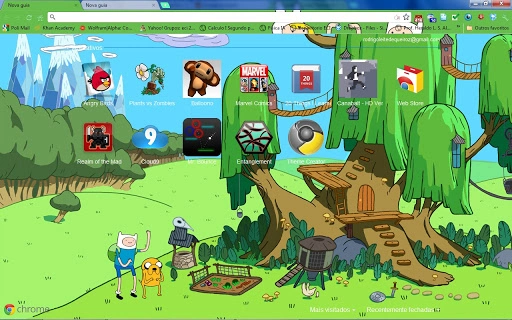
The Adventure Time Chrome Theme is a visually engaging browser customization tool designed for fans of the popular animated series. It transforms the Chrome browser’s appearance with a vibrant, cartoon-inspired aesthetic centered around the iconic Tree Fort and its characters, Finn and Jake. The theme is tailored for users who want to personalize their browsing experience with a fun, immersive environment that reflects their favorite show. Its primary purpose is aesthetic enhancement, offering a unique visual identity to the browser’s new tab page and interface.
Target users include casual internet browsers, particularly younger audiences and Adventure Time enthusiasts. The theme fits resolutions up to 1920 x 1080, making it suitable for most standard desktop displays. It is intended for use in a personal, non-commercial context, as the developer has not claimed ownership of the original artwork or characters. Real-world usage scenarios include daily browsing, social media interaction, and online entertainment, where a playful interface can enhance user engagement and enjoyment.
The developer did not provide additional background information. No official company or organizational affiliation was specified. The theme is distributed as a free desktop utility, compatible with both Windows and Mac operating systems. It is not a functional tool but rather a visual enhancement designed to improve user satisfaction through personalization.
Key Features & Capabilities
- Custom New Tab Page – Features a redesigned Tree Fort backdrop with Finn and Jake standing in front, optimized for resolutions up to 1920 x 1080.
- Enhanced Visual Design – Incorporates bright, cartoon-appropriate colors to match the Adventure Time universe’s energetic atmosphere.
- Resolution Compatibility – Automatically adapts to screen sizes within the 1920 x 1080 range, ensuring a consistent visual experience across devices.
- Character-Based Imagery – Uses official Adventure Time characters and concept art, including contributions from Ghost Shrimp, the original background designers.
- Easy Installation – Designed for seamless integration with the Chrome browser, requiring no technical setup.
Users can expect a cohesive visual experience when opening new tabs, with the theme’s artwork creating an immersive environment. The updated wallpaper offers a rear view of the Tree Fort, enhancing depth and detail compared to earlier versions. While the theme does not alter browser functionality, it improves user engagement through aesthetic appeal. The developer has acknowledged that certain image elements, such as Fiona and Finn, may not display fully if the favorite bar is not locked, indicating a minor limitation in rendering behavior.
User Interface, Workflow & Performance
The theme’s user interface is entirely visual, focusing on the new tab page and browser toolbar. Navigation remains unchanged from standard Chrome behavior, with no modifications to core browser functions. The workflow is straightforward: users install the theme via the Chrome Web Store, and the new tab page immediately reflects the updated design.
Performance impact is minimal, as the theme is a lightweight visual overlay. The developer did not specify resource usage details, but given its 1.2 MB size and lack of background processes, it is expected to have negligible effect on CPU or RAM usage. Stability is consistent with Chrome’s standard theme behavior, with no reported issues in general use. The theme does not interfere with page loading, tab management, or other browser operations.
Users may notice slight rendering delays when switching to the new tab page if the image is large or complex, though this is typical for high-resolution visual themes. Overall, the experience is smooth and optimized for everyday browsing. The visual design is responsive and maintains clarity across supported resolutions.
Compatibility & System Requirements
The theme is compatible with Windows and Mac operating systems, supporting Chrome browsers on both platforms. It is designed for desktop use and does not support mobile or tablet environments. The software version is 1.0, with a file size of 1.2 MB, indicating a compact, lightweight deployment.
Exact system requirements were not listed. However, since it is a Chrome theme, it requires a current version of Google Chrome to function. The developer did not provide information about minimum hardware specifications, such as RAM or processor speed. Compatibility with older Chrome versions is not confirmed. The theme is not designed for use with other browsers, including Firefox, Edge, or Safari.
Pros and Cons
Pros
- Visually appealing design inspired by a popular animated series
- Optimized for high-resolution displays up to 1920 x 1080
- Simple installation with no technical setup required
- Lightweight file size (1.2 MB) with minimal performance impact
- Enhances user experience through immersive, character-based visuals
Cons
- Does not support resolutions beyond 1920 x 1080
- Some image elements may not render correctly if the favorite bar is unlocked
- Only available for Chrome browsers, not other platforms
- No advanced customization options for users
- Not suitable for professional or productivity-focused workflows
FAQ Section
Is this theme compatible with Mac and Windows?
Yes, the Adventure Time Chrome Theme is compatible with both Windows and Mac operating systems, provided they are running a supported version of Google Chrome.
Is the theme free to download and use?
Yes, the theme is available at no cost. It is distributed as a free utility for personal use.
Can I use this theme on other browsers like Firefox or Edge?
No, the theme is specifically designed for Google Chrome and is not compatible with other browsers.
Are there any security risks associated with installing this theme?
As a Chrome Web Store theme, it is subject to Google’s security review process. The theme does not include executable code or data collection mechanisms, and the developer has not claimed ownership of the artwork used.
How often are updates released?
The developer has not specified a release schedule for updates. The current version is 1.0, and no future updates have been announced.
Final Thoughts
The Adventure Time Chrome Theme delivers a fun, visually rich experience for fans of the animated series. With its detailed Tree Fort artwork and vibrant color scheme, it transforms the browser into a playful digital space that reflects the show’s imaginative world. While it serves no functional purpose beyond aesthetics, its design quality and attention to detail make it a standout choice for casual users seeking personalization.
It is ideal for younger users, fans of Adventure Time, and anyone who enjoys expressive browser themes. The lightweight nature and easy setup ensure a smooth experience without performance drawbacks. Although it lacks advanced features and cross-browser support, its strengths lie in visual appeal and ease of use.
For those looking to add a touch of whimsy to their daily browsing, this theme is a solid option. Download Adventure Time Chrome Theme now.
Guides & Tutorials for Adventure Time - Tree Fort 2 Theme for Chrome
How to install Adventure Time - Tree Fort 2 Theme for Chrome
- Click the Preview / Download button above.
- Once redirected, accept the terms and click Install.
- Wait for the Adventure Time - Tree Fort 2 Theme for Chrome download to finish on your device.
How to use Adventure Time - Tree Fort 2 Theme for Chrome
This software is primarily used for its core features described above. Open the app after installation to explore its capabilities.
User Reviews for Adventure Time - Tree Fort 2 Theme for Chrome 0
No reviews found





